Imagine you’re searching for an insurance advisor near you. Google shows you opening hours, address, and reviews directly, before you even click on a website. What you see isn’t a coincidence: behind these enhanced search results is LocalBusiness Schema, among other things.
In this article, you’ll learn what LocalBusiness Schema is, why it’s relevant for you, and how to implement it correctly on your website.
What Is LocalBusiness Schema?
LocalBusiness Schema is a standardised data format from the Schema.org vocabulary. It tells search engines like Google and AI systems like ChatGPT and Claude in a machine-readable way what your business is, where it’s located, and how to reach it.
Technically, LocalBusiness is a subtype of Organization on Schema.org. That means it inherits all properties from Organization, but adds extra properties for local relevance, such as opening hours, coordinates, or price range.
Why Is LocalBusiness Schema Important for Local Businesses?
LocalBusiness Schema matters because:
Rich Results in local search: LocalBusiness Schema is a prerequisite for Google to show enhanced search results, entries with star ratings, opening hours, or a direct link to the contact page. It looks like this:
Google Local Pack: Structured data helps businesses that want to appear in the Local Pack by making it easier for Google to correctly understand and categorise the business.
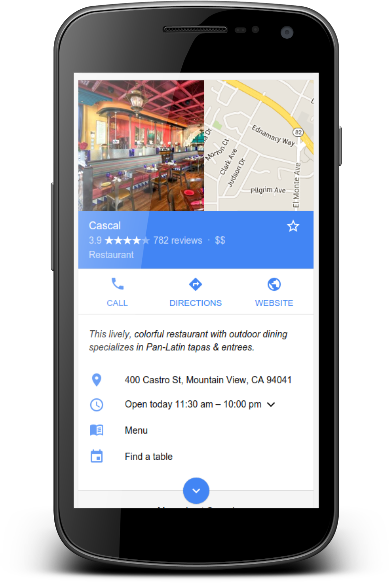
Knowledge Panel: With complete schema markup, Google can build a clean Knowledge Panel for your business, including address, phone number, and website.
Important to understand: schema markup is not a direct ranking factor. Google has explicitly confirmed this. But it sends strong relevance signals and helps Google correctly assign your content.
LocalBusiness vs. Organisation Schema: What’s the Difference?
It’s a question I get asked regularly. And the answer is actually quite simple:
Organisation is used for businesses without physical customer contact, for example pure online service providers, software companies, or national brands without a fixed customer location.
LocalBusiness is the right choice when any of these apply:
- Customers visit your location (restaurant, practice, shop)
- You work within a defined geographic service area (tradesperson, delivery service)
- You have fixed opening hours or a physical address.
In short: if location and accessibility matter to your customers, LocalBusiness is the right markup.
Which Properties Belong in LocalBusiness Schema?
Google distinguishes between required and recommended properties. Here’s an overview:
Required Properties According to Google
name: The official name of your businessaddress(PostalAddress): Full address including street, postcode, city, and country
Recommended Properties
telephone: Phone number in international format (e.g.+41 44 000 00 00)url: Your website URLopeningHoursSpecification: Opening hours structured by day of the week and timegeo(GeoCoordinates): Precise geographic coordinates, useful for mapping servicesimage: Image of the business or logopriceRange: Price category, e.g.€€orCHF CHFaggregateRating: Average rating, if you display reviews on your website
Optional, but Valuable
sameAs: Links to your Google Business Profile, LinkedIn, Facebook, etc. This strengthens entity recognition by Google.hasMap: Link to Google MapsareaServed: The service area, if you don’t have a fixed customer location
The more completely you fill in the markup, the better Google can categorise your business. I recommend filling in at least all the recommended properties.
How to Implement LocalBusiness Schema: Step by Step
The preferred format is JSON-LD.
- Create the JSON-LD code: You can write the code manually, use a generator such as the Google Structured Data Markup Helper, or use AI.
- Embed the code: Add the finished code in the
<head>section of your website. If that’s not possible, you can also place it elsewhere on the page. I’ve written a guide here on how to do this with WordPress. - Validate: Before you’re done, make sure to test it.
Two tools help you check it:
Google Rich Results Test (search.google.com/test/rich-results): Gives you a direct preview of whether Google recognises your markup and which rich results would be possible. Error messages and warnings are clearly shown.
Schema Markup Validator (validator.schema.org): Checks whether your markup is technically correct according to the Schema.org standard.
After implementing, it’s also worth checking Google Search Console under “Enhancements”. There you can see whether Google has found your markup and whether there are any errors or warnings to fix.
Here’s an example for a fictional Swiss business:
<script type="application/ld+json">
{
  "@context": "https://schema.org",
  "@type": "LocalBusiness",
  "name": "Muster GmbH",
  "address": {
    "@type": "PostalAddress",
    "streetAddress": "Bahnhofstrasse 10",
    "addressLocality": "Zürich",
    "postalCode": "8001",
    "addressCountry": "CH"
  },
  "telephone": "+41 44 000 00 00",
  "url": "https://www.mustergmbh.ch",
  "image": "https://www.mustergmbh.ch/images/logo.jpg",
  "priceRange": "CHF CHF",
  "openingHoursSpecification": [
    {
      "@type": "OpeningHoursSpecification",
      "dayOfWeek": ["Monday", "Tuesday", "Wednesday", "Thursday", "Friday"],
      "opens": "09:00",
      "closes": "18:00"
    }
  ],
  "sameAs": [
    "https://www.google.com/maps/place/...",
    "https://www.linkedin.com/company/mustergmbh"
  ]
}
</script>
Common Mistakes with LocalBusiness Schema
In my work as an SEO consultant, these are things I regularly see that can be avoided:
- NAP inconsistency: The name, address, and phone number in the schema don’t match the details on the website or in Google Business Profile. This confuses Google. All three sources must be identical.
- Outdated opening hours: Changed your hours but didn’t update the schema? Google then shows incorrect information. That damages your credibility.
- Incorrectly formatted addresses: Abbreviations, incomplete details, or inconsistent spelling can mean Google doesn’t correctly interpret the address.
LocalBusiness Schema for Multiple Locations
If you run multiple branches or locations, there’s one clear rule: each location gets its own page, and each page gets its own LocalBusiness markup with the specific address, phone number, and opening hours for that location.
Using a generic markup for all locations is a common mistake. Google can’t distinguish which information belongs to which place. That costs local visibility, especially when users make location-based searches. For a holistic location page strategy, it’s worth looking at the right keyword research.
Testing and Monitoring LocalBusiness Schema
Implemented doesn’t mean correctly implemented.
LocalBusiness FAQ
No, Google has confirmed that schema markup is not a direct ranking factor. But it helps search engines better categorise your business and makes you eligible for rich results, meaning enhanced search results with opening hours, reviews, or directions. That can significantly improve click-through rates, even if the ranking itself stays the same.
LocalBusiness Schema belongs on your website’s homepage or on the contact page. Not on every subpage. If you have multiple locations, create a separate page for each location with the corresponding markup including the correct address and opening hours for that location.
Google Business Profile (formerly known as Google My Business) is a separate listing in Google’s own system. LocalBusiness Schema is code directly on your website. The two complement each other: the schema on the website supports the signals from your Google Business Profile. Ideally, all details in both sources are identical (NAP consistency).
Yes. If you use WordPress, plugins like Yoast SEO, Rank Math, or Schema Pro handle most of the work automatically. Alternatively, there are online generators that let you create the JSON-LD code without having to write it manually. You then add the finished code in the <head> section of your website.
NAP stands for Name, Address, Phone. These three details should be identical on your website, in the LocalBusiness Schema, and in your Google Business Profile. Discrepancies, such as different spellings of the address, confuse search engines and can negatively affect your local visibility.
I’m a local SEO consultant
I help businesses with local SEO. Read all about my local SEO offering here and I’d love to speak to you in a discovery call. The discovery call is for free.
